Hey, It will be a bit tricky since my project file is a bit of a test bed that includes all my different packs and experimental packs for possible future release. I'll see if I can clear it up a bit and include it in the next update since its a great suggestion :) - Thank you.
Hey, the Pocket Hero is a 16x16 sprite but he sits on a 48x48 canvas, its just so that there is more space to animate sword slashes etc. hope that answers your question
I don't suppose you could share the tilemap setup in Godot. I'm having trouble with understanding how to set up the more complicated things like cliffs and such.
Hi, of couse. Do you mean for the Autotile set up? Here is a screenshot of the auto tile setup I used for the screenshots.
Using this method you will have to place the cliff face manually depending on the height of the cliff you want, but the cliff top edges are auto tiled. If you want to auto tile the cliff edges too, in Godot, you can us CTRL in the tile map setup to merge the cliff face tiles vertically, and then they would be included in the auto tile (I think).
Hope this helps and you enjoy the pack. let me know if i misunderstood your question.
If you make a game or prototype, I would love to play it!
← Return to asset pack
Comments
Log in with itch.io to leave a comment.
Hi, how do I resize the 16x16 tiles to other sizes like 32x32 or 48x48?
Can you share the Godot project files :) of the example pics ?
just for reference :) settings and stuff!
Hey, It will be a bit tricky since my project file is a bit of a test bed that includes all my different packs and experimental packs for possible future release. I'll see if I can clear it up a bit and include it in the next update since its a great suggestion :) - Thank you.
Ahh, that would be awesome 😄
How does the clean up and the update going any process ? :)
is the Pocket Hero sheet 48x48 or 16x16?
The file name says 48x48, but the pack is 16x16?
Hey, the Pocket Hero is a 16x16 sprite but he sits on a 48x48 canvas, its just so that there is more space to animate sword slashes etc. hope that answers your question
Thanks for explaining! 🙂 When I try to animate the sheet, Godot requires a size of 96×96, which is a bit confusing, right?
I’ll look at it again later—maybe I did something wrong?
This Pocket bundle is growing very well, good job!
Thanks so much! I really appreciate your comment and support
Did you make the trees yourself??
Hi, I sure did, every tree was created from scratch in Aseprite by me, you can see some of my working process in the snip below.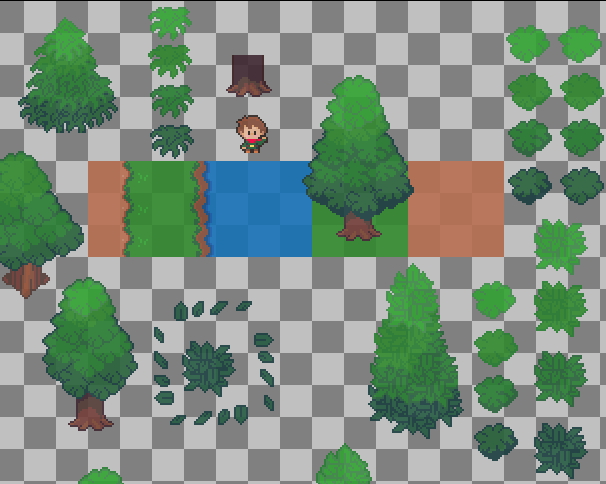
wow, these are really good. I like the rounded fluffy ones haha
thanks a lot, I’m glad you like it
how do you make your maps/levels? do you paint them in aseprite or use tile editor?
I import the tilemaps into Godot and build the maps and levels there
I don't suppose you could share the tilemap setup in Godot. I'm having trouble with understanding how to set up the more complicated things like cliffs and such.
Hi, of couse. Do you mean for the Autotile set up? Here is a screenshot of the auto tile setup I used for the screenshots.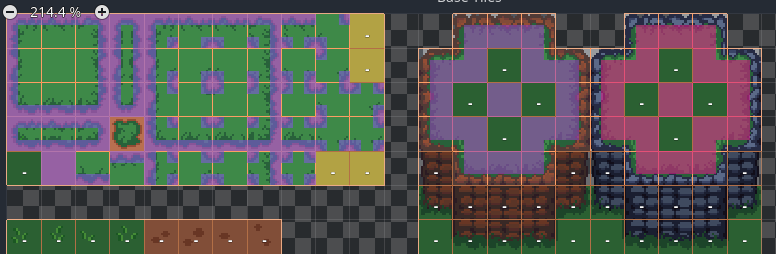
Using this method you will have to place the cliff face manually depending on the height of the cliff you want, but the cliff top edges are auto tiled.
If you want to auto tile the cliff edges too, in Godot, you can us CTRL in the tile map setup to merge the cliff face tiles vertically, and then they would be included in the auto tile (I think).
Hope this helps and you enjoy the pack. let me know if i misunderstood your question.
If you make a game or prototype, I would love to play it!
I'll keep you in mind once my game is further along.
Added a couple of extra tiles (cliff opposite corners) and this nicely auto-tiles.
That's great! Thanks